
July 18, 2026
Understanding your visibility dashboard
Overview of Your Dashboard
The AEOTrack dashboard provides a centralized view of your brand’s presence in AI answer engines. It is designed to give you a quick health check of your visibility, summarize performance metrics, and show you exactly where to focus your Answer Engine Optimization (AEO) efforts.
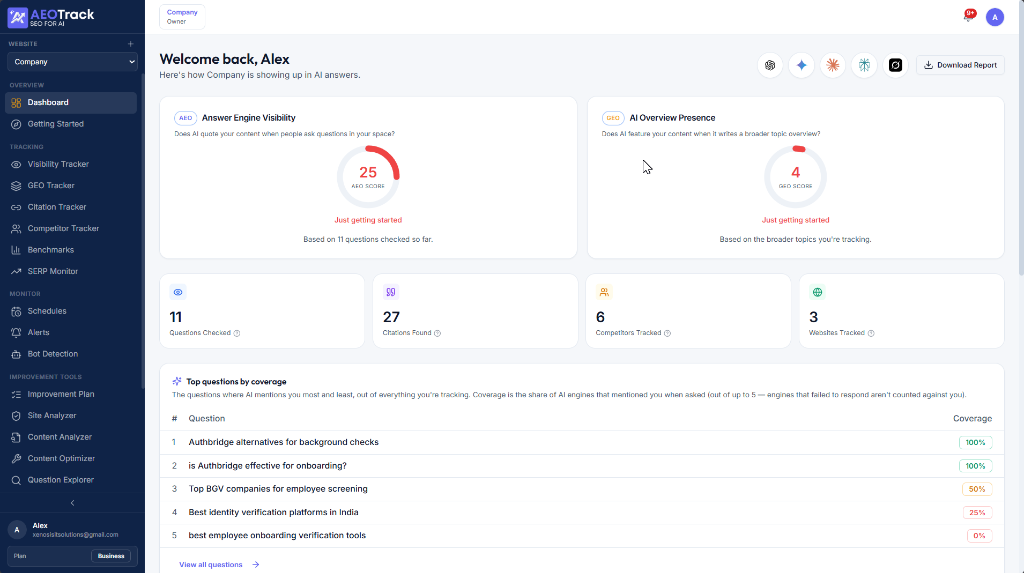
On the Dashboard
At the top of your dashboard, you will find your primary performance gauges:
- AEO Score (Answer Engine Visibility) — This score represents the percentage of tracked prompts where your brand was mentioned or recommended. For example, if you track 11 prompts and appear in 2, your AEO Score is 25.
- GEO Score (AI Overview Presence) — This score measures how frequently generative search tools (like Google AI Overviews) reference your content when synthesizing a broader topic overview.
Key Stats Summary
Directly below the main scores is your high-level metrics bar:
- Questions Checked — The total number of unique search prompts currently tracked and scanned in your workspace.
- Citations Found — The number of times AI engines have linked directly back to your website's pages as a reference source.
- Competitors Tracked — The total number of competitor domains you are actively benchmarking against.
- Websites Tracked — The number of your own websites being monitored under this workspace.
Top Questions by Coverage
This table lists the specific search queries where your brand is mentioned most frequently across the connected engines.
- Coverage percentage is the share of AI engines that successfully mentioned your brand when asked a specific prompt (out of the total active engines, such as ChatGPT, Perplexity, Gemini, and Copilot).
- It highlights your strongest queries (e.g., 100% coverage) and alerts you to content gaps where you have 0% visibility.
Navigation & Menu Tabs
AEOTrack is divided into four main sections, accessible from your left-hand sidebar menu:
1. Tracking
Use these tools to measure your presence across search modes:
- Visibility Tracker — Monitor daily trends for individual search prompts.
- GEO Tracker — Track how well your site is optimized for generative search indexing.
- Citation Tracker — Audit which URLs are being referenced and linked as sources.
- Competitor Tracker — Compare your Share of Voice side-by-side with industry rivals.
- Benchmarks — View industry-wide standards and how you stack up.
- SERP Monitor — Track traditional search engine results pages alongside AI answers.
2. Monitor
Configure schedules and notifications to stay updated:
- Schedules — Set up automated scan intervals (daily, weekly, or custom).
- Alerts — Receive instant email or Slack notifications when your visibility drops.
- Bot Detection — Monitor AI crawler and scraper visits to your site.
3. Improvement Tools
Take action to increase your visibility:
- Improvement Plan — Get step-by-step optimization checklists tailored to your pages.
- Site Analyzer — Run automated audits on your domain structure.
- Content Analyzer — Evaluate individual blog posts and articles for AI readability.
- Content Optimizer — Optimize page layouts and metadata automatically.
- Question Explorer — Discover new natural-language questions related to your keywords.
- FAQ Generator — Draft structured FAQs designed to be parsed and cited by AI engines.
4. Account
Manage your workspace, billing, and team settings:
- Integrations — Connect external tools (Google Analytics, Slack, Git).
- Team — Invite collaborators and manage permissions.
- Billing — Manage your plans, download invoices, and update Stripe details.
- Settings — Adjust workspace domains, email notifications, and overall configurations.