
July 18, 2026
Complete Setup: From Sign Up to Onboarding
Creating New Account
Before you can monitor your brand visibility across AI answer engines, you need to set up a workspace account:
- Sign Up — Head over to the sign up page and fill in your details:
- Your name — Used to personalize your workspace interface.
- Email address — Your primary account login and notification email.
- Your website — The main domain you want AEOTrack to scan for citations and mentions.
- Password — Choose a secure password for your workspace.
- Verify Your Account — Check your email inbox for a verification link. Click the link to confirm your email.
- Log In — Enter your verified email and password to access the setup wizard.
Onboarding Setup Wizard
Once you log in, you will be directed straight to the onboarding screen to initialize tracking. The setup wizard is divided into five guided steps:
Step 1: Scan & Confirm (Tell us what to track)
Input your primary website domain. AEOTrack will perform an initial scan of your site's metadata and structure to identify what is publicly visible to AI crawlers.
Step 2: Competitors (Who you're up against)
Add the domains of your top competitors. This allows the system to compare your brand's visibility side-by-side with rival companies across the same search prompts.
Step 3: Website Analysis (Real issues we found)
AEOTrack analyzes your site's current SEO and GEO friendliness. It scans for technical obstacles (e.g., blocks in robots.txt, structured schema issues) that could prevent answer engines from citing you.
Step 4: Questions to Track (What people ask AI)
Define the initial set of search prompts and questions you want to monitor. You can enter your own keywords or choose from suggestions generated by our AI Prompt Research tool.
Step 5: AEO Check (Your starting score)
Our scanning pipeline queries major AI platforms (ChatGPT, Perplexity, Gemini, Copilot) to establish your baseline scores.
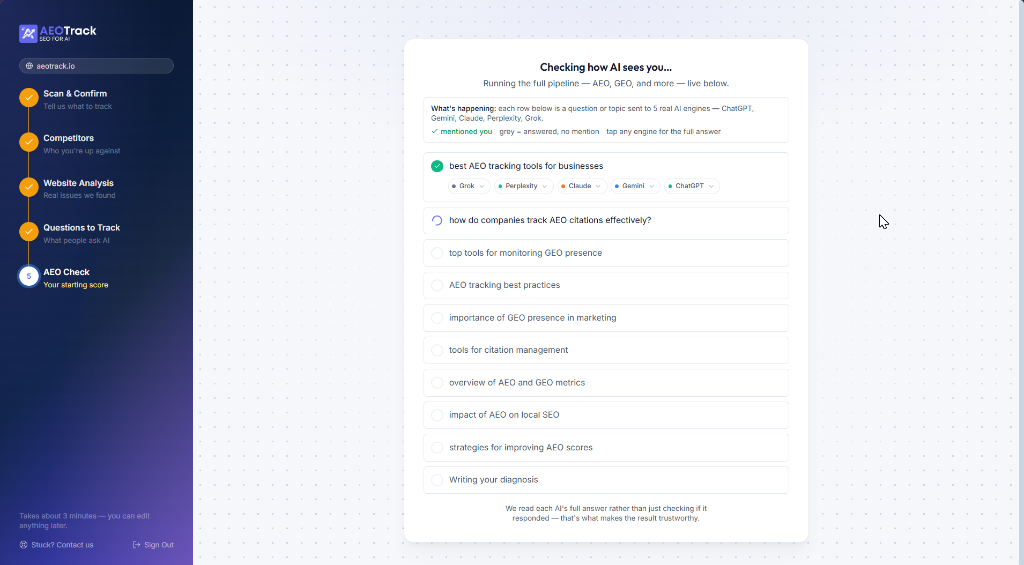
[!NOTE] The scanning process in Step 5 can take up to 3-5 minutes to complete as we run live queries across all search models. Please keep the page open while the progress indicators load.
Demo Video Walkthrough
Demo Video Walkthrough: (Demo video placeholder will be added here)
What's Next
Once the initial AEO Check is complete, you will immediately gain access to your main dashboard. Head over to Understanding your visibility dashboard to learn how to read your scores, track mentions, and analyze citations.