
September 23, 2026
Zapier Integration Guide
Overview
Automate custom workflows (such as emailing your team, updating Trello cards, or logging drops to a spreadsheet) whenever your website experiences an AEO/GEO score drop.
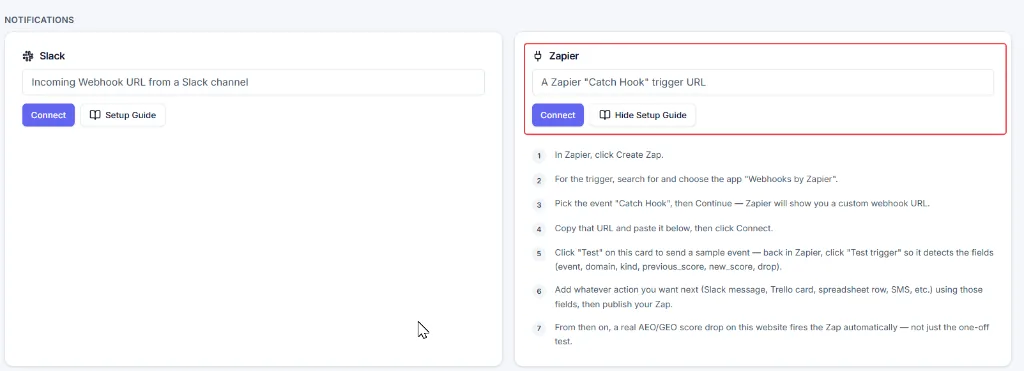
Step-by-Step Setup Guide
- Sign up for Zapier and log in to your account.
- Open zapier.com/app.
- From the dashboard sidebar, click Create.
- Select Zap from the dropdown options.
- You will see multiple cards. In the trigger card, search for and select Webhooks by Zapier.
- Choose the event Catch Hook and click Continue.
- Zapier will generate a custom webhook URL.
- In the Configure step, enter any name for your project in Pick off a Child Key.
- Copy the webhook URL and paste it into the integration settings, then click Connect.
- Click Test on the integration card to send a sample event.
- Return to Zapier and click Test Trigger so that Zapier detects the available fields. Two events fire, and each carries an
eventfield you can filter on:score_drop— a real drop in the website's AEO or GEO score (outside the score's confidence range):event,domain,kind(aeoorgeo),previous_score,new_score,drop,textcheck_completed— after every scheduled check finishes:event,domain,aeo_score,geo_score,queries_checked,text
- Add any action you want, such as sending a Slack message, creating a Trello card, adding a spreadsheet row, sending an SMS, or triggering another app. Add a Filter step on
eventif a Zap should only react to one of the two. - Use the detected fields to customize your action, then publish your Zap.
From that point onward, Zapier triggers your workflow on every real AEO or GEO score drop and after every scheduled check — not just the initial test event. Every delivery is signed with an X-AEOTrack-Signature header; see Microsoft Teams, custom webhooks and the signing secret if you want to verify it.