
September 23, 2026
Complete AEOTrack Setup Guide
Welcome to AEOTrack!
This guide explains how AEOTrack works, what AEO and GEO mean, and how to set up your account to start tracking your brand's visibility across AI search engines such as ChatGPT, Gemini, Claude, Perplexity, and Grok.
What is AEO?
AEO (Answer Engine Optimization) is the process of optimizing your website so that AI search engines can understand, summarize, and cite your content in their answers.
Unlike traditional SEO, which focuses on ranking pages in Google search results, AEO focuses on helping AI assistants answer users' questions using your content.
AEO helps you:
- Increase AI visibility.
- Improve citation opportunities.
- Structure content for large language models.
- Optimize FAQs and schema markup.
- Track mentions across AI platforms.
What is GEO?
GEO (Generative Engine Optimization) focuses on how AI models generate complete responses and whether your brand appears in broader AI-generated explanations.
GEO helps answer questions like:
- Does AI mention your brand?
- Is your content used in AI-generated summaries?
- How often do competitors appear instead of you?
- Which topics drive AI visibility?
Getting Started
To access detailed reports, tracking, competitor analysis, and monitoring tools, you must create an AEOTrack account.
Step 1: Create Your Account
Click Start free trial and create your account either with Continue with Google or with your name, work email, website and a password. The trial is 14 days with no card.
With email and password, AEOTrack sends a verification email at the same time — you do not have to open it before you continue.
Step 2: Verify Your Email (within 24 hours)
- You go straight into onboarding; a banner reminds you to verify.
- Click the link in the verification email within 24 hours. After that, the account pauses — you can still sign in and see everything, but scheduled checks, alerts and report emails stop until the address is verified. Resend verification email on the banner sends a fresh link.
- Google sign-in counts as verified immediately. See Google sign-in and email verification.
Onboarding Setup
The onboarding process helps AEOTrack understand your website, competitors, and industry.
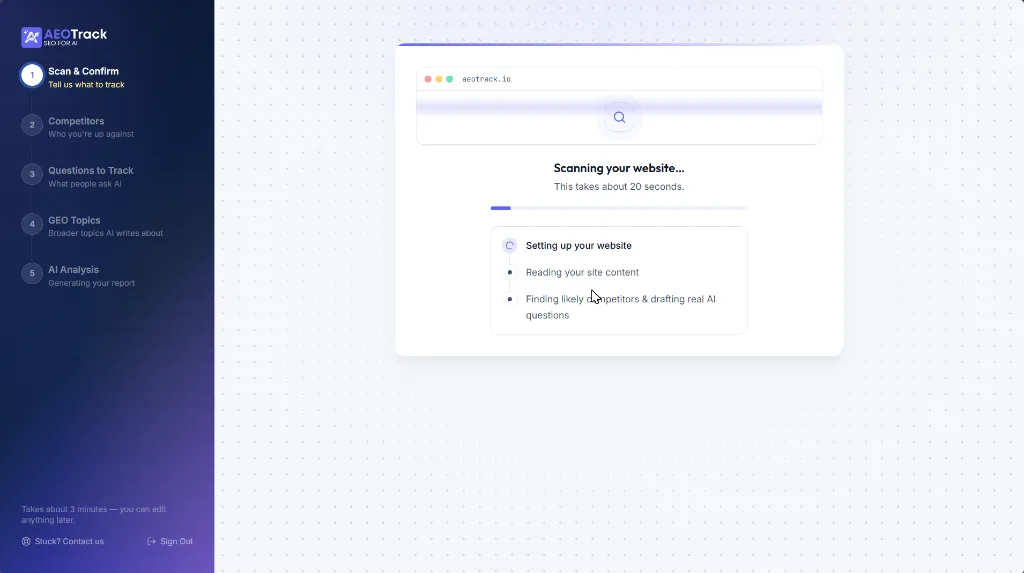
Step 1: Scan & Confirm (Tell us what to track)
- Enter your website domain (e.g.,
aeotrack.io). - AEOTrack performs a live scan of your website. No installation, plugins, or code changes are required.
- The scan analyzes public website pages, homepage content, website structure, and existing SEO and schema signals.
- After scanning, select your brand name and choose your company size.

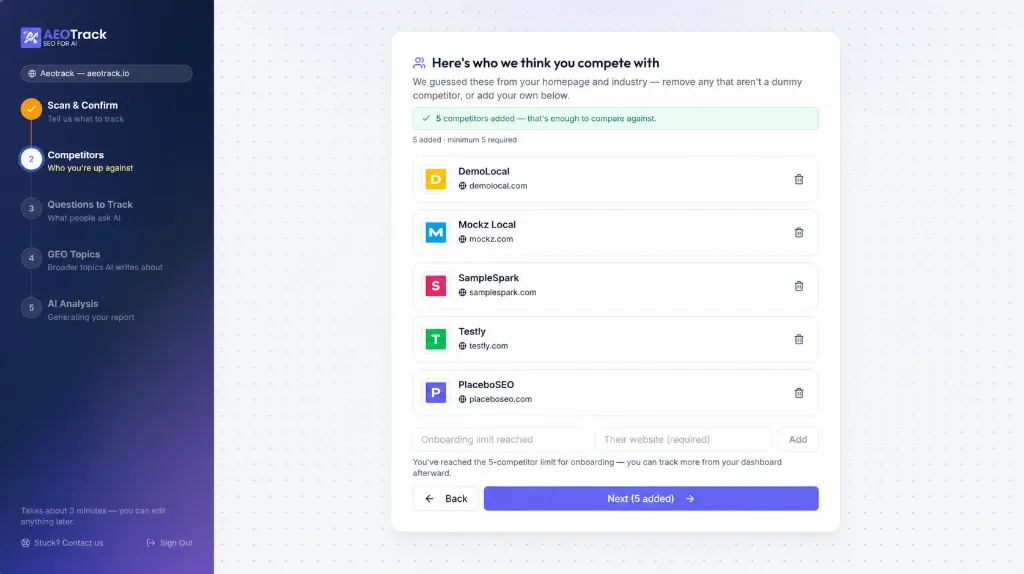
Step 2: Competitor Analysis (Who you're up against)
- AEOTrack automatically suggests competitors based on your website and industry.
- You can keep suggested competitors, remove competitors using the trash icon, or add custom competitors manually.
- For each competitor, provide the competitor name and website URL.
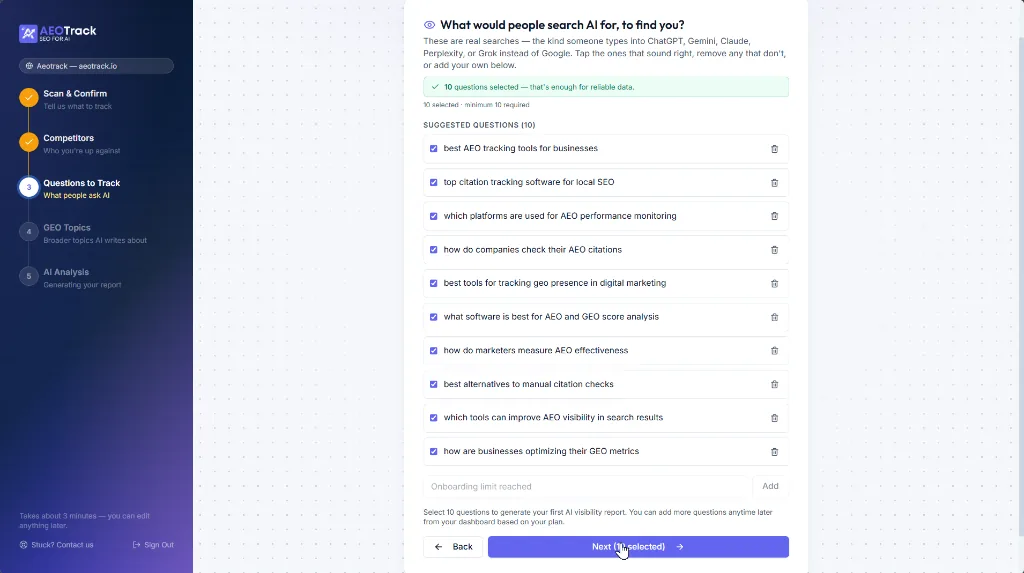
Step 3: Questions to Track (What people ask AI)
- These are real questions users ask platforms like ChatGPT, Gemini, Claude, Perplexity, and Grok.
- Keep at least 3 questions to run your first check; 10 are suggested and recommended, and you can add more later up to your plan's ceiling.
- You can select suggested questions, remove irrelevant questions, or add your own prompts.
- These questions become your active tracking prompts.
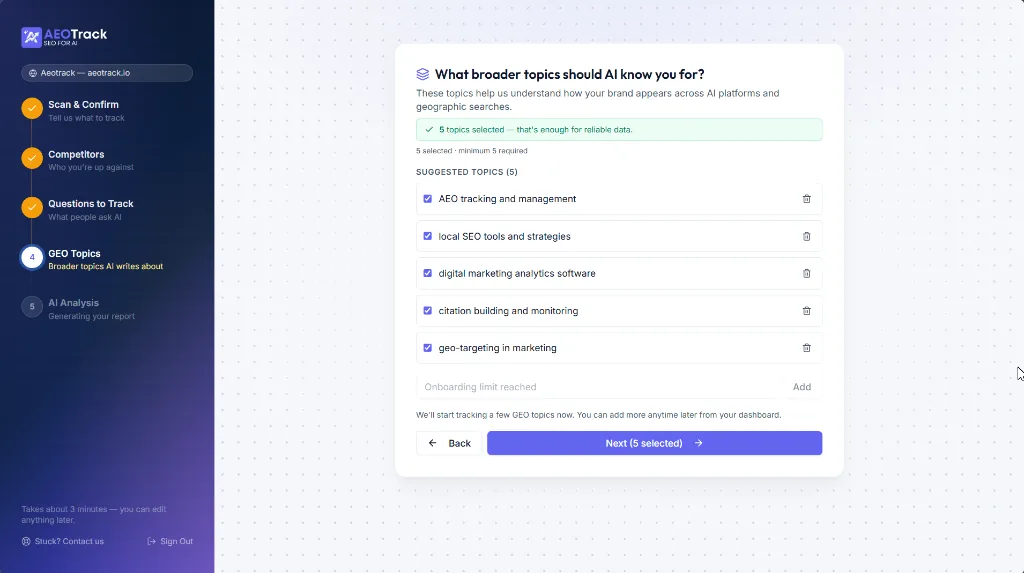
Step 4: GEO Topics (Broader topics AI writes about)
- Pick at least one topic to continue; the suggestions are usually the right starting set.
- These topics are how AEOTrack measures GEO: whether the same AI engines include you when they write a broader overview of a subject rather than answer one specific question.
Step 5: AEO Check (Your starting score)
AEOTrack now runs its complete analysis pipeline, including AEO analysis, GEO analysis, brand visibility, competitor comparisons, AI citations, and content evaluation.
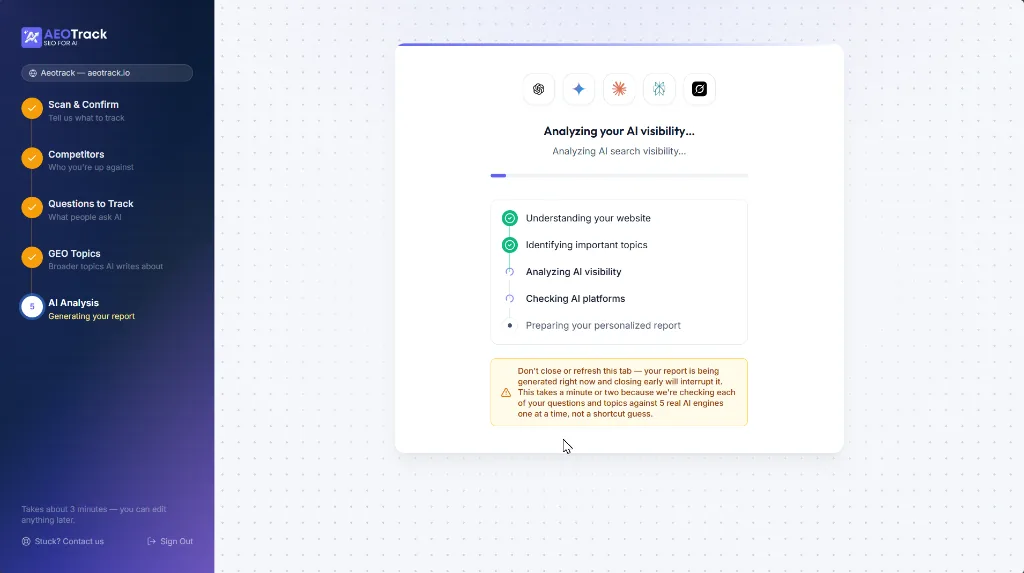
[!NOTE] This step can take about 3-5 minutes as we query real AI engines for all questions and topics.
What's happening behind the scenes?
Each question is sent to five real AI engines: ChatGPT, Gemini, Claude, Perplexity, and Grok. For every response, AEOTrack tracks:
- Whether your brand was mentioned (represented by a green check badge ✅).
- Whether competitors were mentioned (represented by a grey check badge ⚪).
- Citations and sources used.
- Share of voice and answer quality.
You can tap any AI engine to view the full response.
Your Results
After the scan completes, you will receive:
- Scores: AEO Score, GEO Score, and Content Score.
- Insights:
- What's working: Highlights strong content areas, good structure, existing citations, and AI-friendly sections.
- Problems and solutions: Identifies missing schema, weak content, competitor advantages, internal linking issues, and FAQ gaps.
Click Go to Dashboard to continue.
Core Monitoring Features
Visibility Tracker
The Visibility Tracker is a core monitoring tool that shows whether AI platforms mention your brand when people ask questions related to your space or industry.

Key Capabilities & Features:
- AEO Score Tracking: Displays your overall AEO Score, which represents the percentage of your tracked questions where at least one AI search engine mentions your brand.
- Question Management:
- Add Custom Questions: Easily add specific search prompts your customers might ask an AI assistant.
- AI Recommendations: Click
Suggest questionsto let AEOTrack's AI brainstorm and recommend relevant questions for your industry.
- In-Depth Analytics Table:
- Query List: A searchable table of all your tracked questions.
- Coverage: The share of AI search engines where your brand is mentioned.
- Mentions: The number of real AI engines mentioning your brand out of the total checked.
- Sentiment Analysis: Evaluates the tone of the AI response when mentioning your brand.
- Engine Indicators: Real-time status icons for search engines checked (such as ChatGPT, Gemini, Claude, Perplexity, and Grok).
- Citations Count: Tracks how many direct links lead to your website from the AI responses.
- Competitor Tracking: Displays which rival brands are appearing in responses for each question.
- Manual Run: Refresh individual queries on demand to get instant updates.
- Breakdown Details: Tap any row in the table (
>) to drill down into engine-by-engine responses, exact citation URLs, and optimization opportunities.
GEO Tracker
Helps you understand how often your brand appears in broader topic summaries, which topics drive visibility, and which competitors dominate.
Citation Tracker
Explore the URLs that AI search engines cite when answering your tracked prompts, monitoring cited pages, citation frequency, and source quality.
Competitor Intelligence
Discover which competitors appear in AI answers, their visibility trends, their strongest topics, and opportunities to outrank them.
Benchmark
Compare your AEO trend, GEO trend, and Share of Voice against competitors over time using real historical data.
SERP Monitor
Monitor how your website ranks in Google Search for specific keywords, checking rankings, position changes, and keyword performance.
Improvement Tools
AEOTrack includes powerful optimization tools to boost your rankings:
- Improvement Plan — Get prioritized recommendations tailored to your website.
- Site Analyzer — Analyze technical issues, structure, performance, and AI readiness.
- Content Analyzer — Review readability, headings, content quality, and coverage.
- Content Optimizer — Improve AI visibility, structure, citability, and search performance.
- Question Explorer — Discover high-value prompts, emerging topics, and AI search trends.
- FAQ Generator — Generate AI-friendly FAQs, structured content, and schema-ready questions.
Integrations
Connect AEOTrack with your existing tools to automate workflows, content updates, notifications, and reporting. Supported integrations:
- GitHub (pull requests with your generated files)
- Slack, Microsoft Teams, Zapier and custom webhooks
- Google Search Console and Google Analytics
- WordPress (AI-crawler visits and FAQ schema) and Shopify
- HubSpot and Salesforce, IndexNow, Microsoft Clarity
- Google Sheets and Looker Studio feeds, the public API and the MCP server
Summary Workflow
Create Account (Google or email)
      ↓
Complete Onboarding
      ↓
Verify Email (within 24 hours)
      ↓
Scan Website
      ↓
Add Competitors
      ↓
Select Questions
      ↓
Run AEO & GEO Analysis
      ↓
Track AI Visibility
      ↓
Monitor Competitors
      ↓
Improve Content
      ↓
Grow Your Brand Presence in AI Search
Need Help?
If you need assistance with onboarding, tracking, integrations, or optimization recommendations, visit the AEOTrack Help Center and explore the setup guides and documentation.